
Lesson 7 of 12
Edit the Video in CapCut: Flag, Hook and Call to Action
Three seconds to stop the scroll, one clear benefit, and an order button in the head of the viewer.
Set up the project
Open CapCut (computer or phone), create a new project in 9:16 and add your dubbed video. Cut the parts that show another price, another brand or another country.
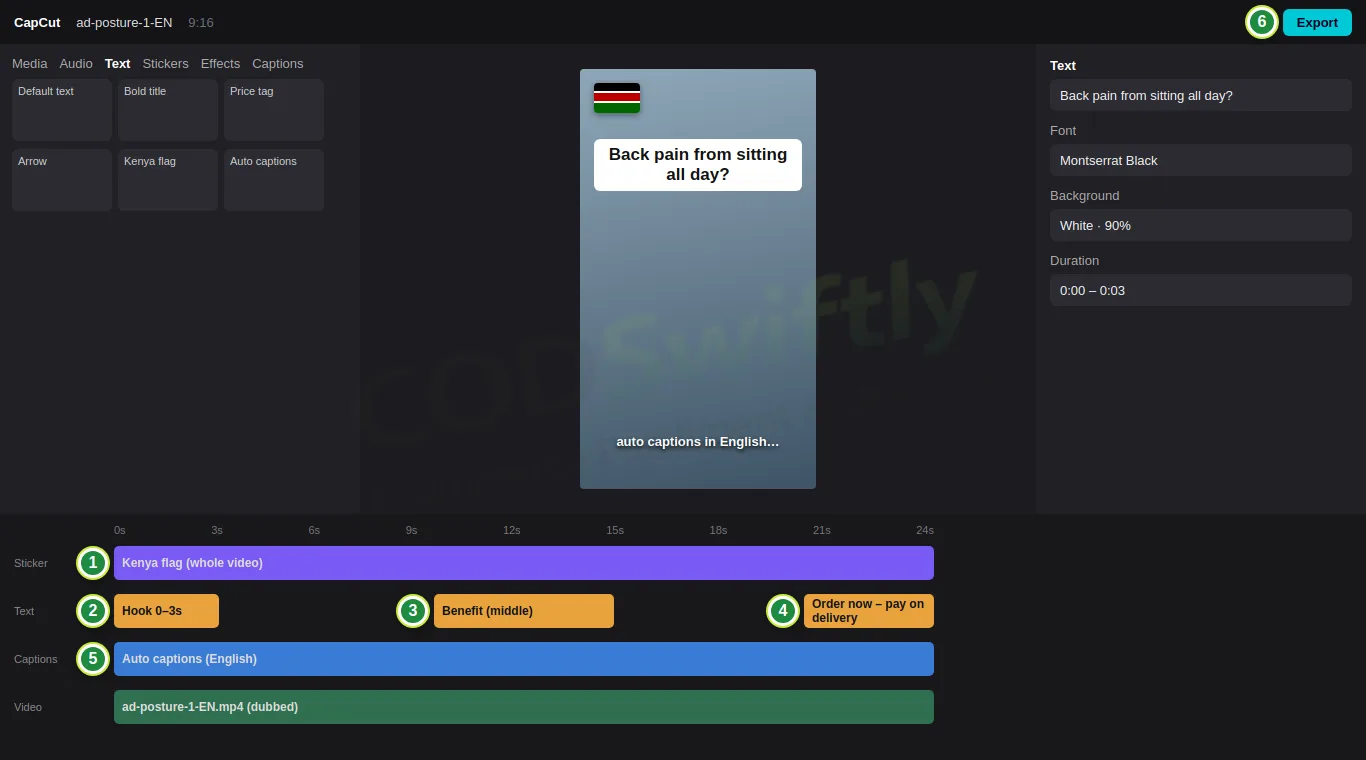
- 1The flag of your country as a sticker, small, in a corner, for the whole video: people stop when they see their own flag.
- 2Hook, 0 to 3 seconds: a short question or a problem in big text (“Back pain from sitting all day?”).
- 3Middle: the main benefit in a few words.
- 4End: “Order now – pay on delivery”, with the price if it is good.
- 5Auto captions in English: most people watch without sound.
- 6Export: 1080p, 30 fps.
Make 2 versions of each video
For each product, make 2 videos with 2 different hooks (for example a question, and a before/after). In lesson 9 you test them side by side, and the numbers choose the winner, not your taste.
The numbers in the pictures are examples that show how the screens work. They are not a promise of results.
Follow the course with a real account
Create your free CODSwiftly account: storage, call center confirmation, delivery and payouts in Kenya, Tanzania, Ghana and Zambia.