
Read Your Results and Decide
After 2 days the numbers speak. Keep what is cheap and stable, stop the rest, and never decide on one day alone.
Read the cost per result
After 2 days (about 10 USD spent per ad set), open Ads Manager → Ad sets. Here a result is an order sent with the COD form.
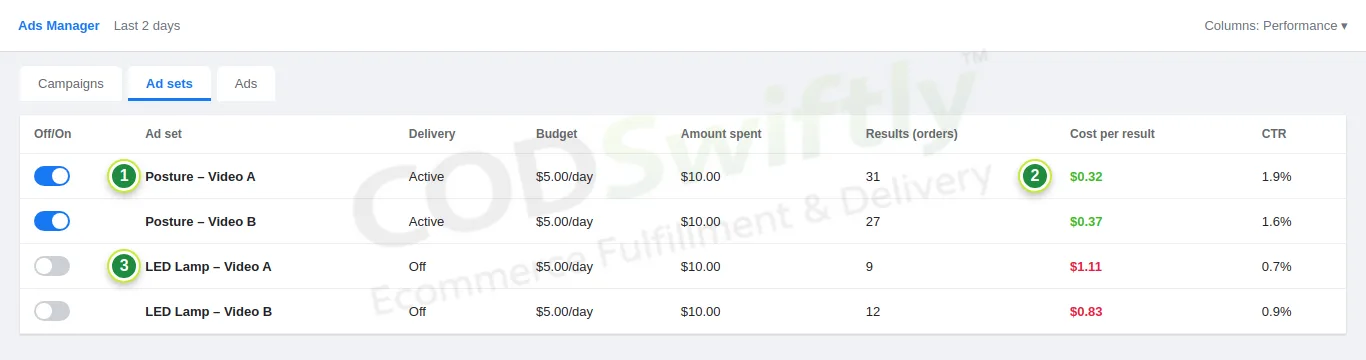
- 1An ad set that works: 31 orders for 10 USD.
- 2Cost per result 0.32 USD: cheap and stable, keep it.
- 3Expensive ad sets (more than 0.80 USD): turn them off.
A cost per result around 0.30 to 0.50 USD, stable for 2 days, is a good sign. Compare it with the Target CPL of your product in the COD Calculator (lesson 2): it must be lower.
Check the quality in CODSwiftly
Cheap orders are only good if they are confirmed and delivered. Open Orders in CODSwiftly: look at how many are confirmed, and how many have no answer or are cancelled. A product with cheap orders but very low confirmation is not a winner.
What to do next
- Winner (cheap, stable, well confirmed): keep it running and go to lesson 11 to order your stock.
- Middle: try 2 new videos with new hooks before you give up.
- Loser: turn it off and test the next product of your list.
To grow a winner, raise its budget slowly (about 20 to 30% every 2 days) and keep adding new videos: the same video gets tired after some time.
The numbers in the pictures are examples that show how the screens work. They are not a promise of results.
Follow the course with a real account
Create your free CODSwiftly account: storage, call center confirmation, delivery and payouts in Kenya, Tanzania, Ghana and Zambia.