Find a Winning Product with CODSwiftly Ad Spy
Do not guess. Look at what other sellers already pay to advertise for weeks, and keep only those products.
Why start with the ads of others
An ad that runs for many days and is copied many times is an ad that makes money: nobody pays for weeks for an ad that does not sell. Big English-speaking markets like Nigeria, Kenya or Ghana show thousands of COD ads every day. A product that sells there has a strong chance to sell in our markets too: Kenya, Tanzania, Ghana and Zambia.
Install CODSwiftly Ad Spy
In your CODSwiftly account, open Ad Spy in the menu and click Download Extension. The page shows each step to add it to Google Chrome on a computer:
- Unzip the file: you get a folder named codswiftly_ext.
- In Chrome, type chrome://extensions and turn on Developer mode.
- Click Load unpacked and choose the folder.
- Pin the extension, click our logo and sign in with your CODSwiftly email and password.
Open the Ad Library and choose the country
Click Open the Ad Library in the extension. Our tools appear above the ads after a few seconds.
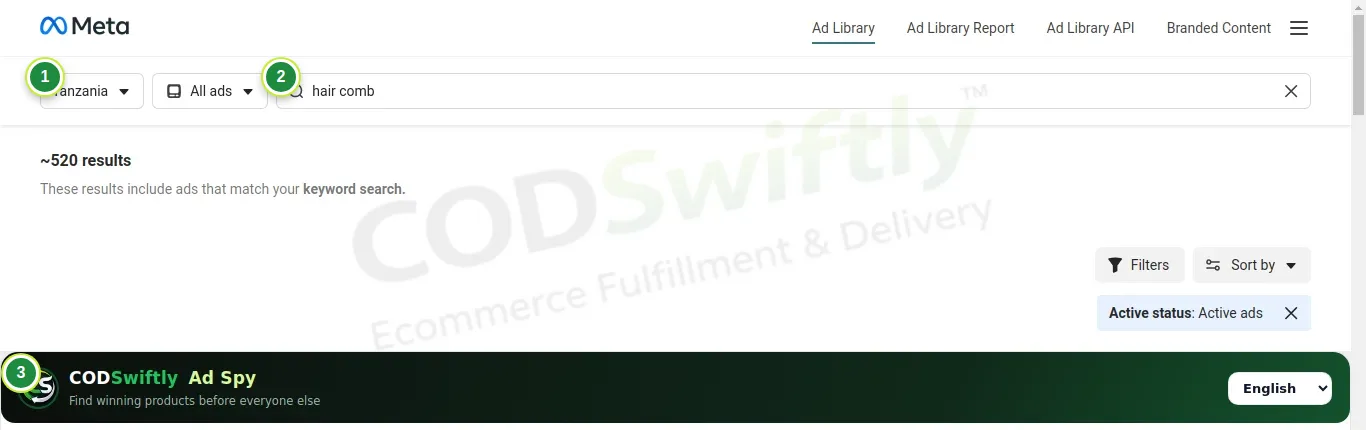
- 1The country of the ads (for example Nigeria).
- 2A product word, or leave it empty to see everything.
- 3The CODSwiftly Ad Spy bar: our tools are under it.
Filter to see only the winners
Use the tools in this order. In one minute you go from thousands of ads to a short list of products that really sell.
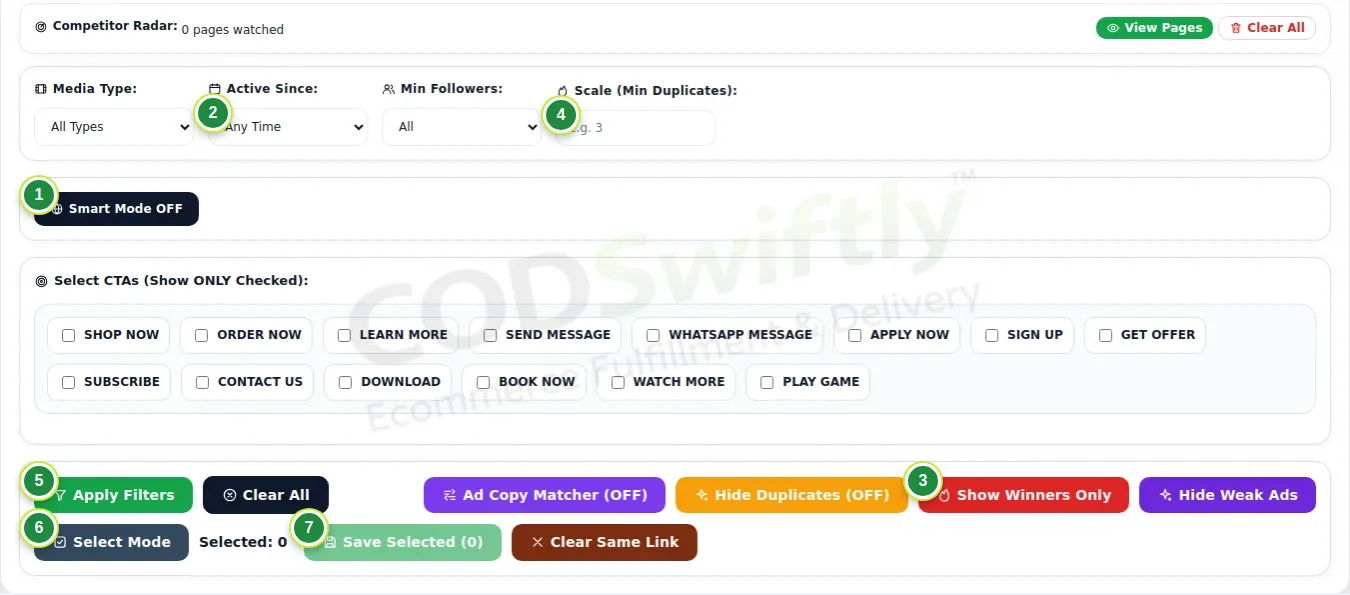
- 1Smart Mode: pick the country by language and continent.
- 2Active Since: choose 1 week. An ad that runs for a week or more pays for itself.
- 3Show Winners Only: keeps the ads running 7 days or more and used 3 times or more.
- 4Scale (Min Duplicates): type 3 to hide the ads nobody copies.
- 5Apply Filters: your choices are remembered.
- 6Select Mode: tick the ads you like.
- 7Save Selected: downloads a ZIP with the videos, the pictures and a sheet with the page, the store link, the days and the text.
Read each ad in 5 seconds
Every ad gets a small badge: followers, days active (d) and copies (x). Green = winner, orange = promising, red = still a test.
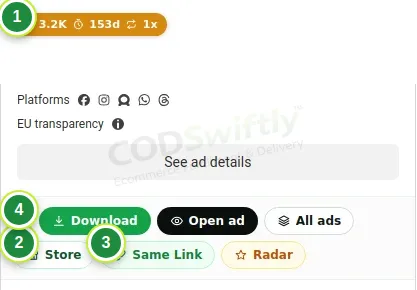
- 1The badge: followers, days active, copies.
- 2Store: opens the product page of the advertiser, with its price, offer and photos.
- 3Same Link: shows every ad that sends to the same product, so you see all its videos and angles.
- 4Download: saves the video and the pictures of this ad.
The numbers in the pictures are examples that show how the screens work. They are not a promise of results.
Follow the course with a real account
Create your free CODSwiftly account: storage, call center confirmation, delivery and payouts in Kenya, Tanzania, Ghana and Zambia.