
Lesson 8 of 12
Prepare Facebook Ads: Page, Business Portfolio, Ad Account and Pixel
Ten minutes of setup before the first ad saves you from blocked accounts and ads that cannot learn.
The 5 things you need
- A Facebook Page for your store: name, logo, cover, and 3 or 4 posts so it does not look empty.
- A business portfolio on business.facebook.com: it holds your Page, your ad account and your pixel.
- An ad account: currency USD, time zone of the country you sell in.
- A payment method on the ad account (a card that works for online payments).
- A pixel (dataset) connected to Shopify, so Facebook knows who orders.
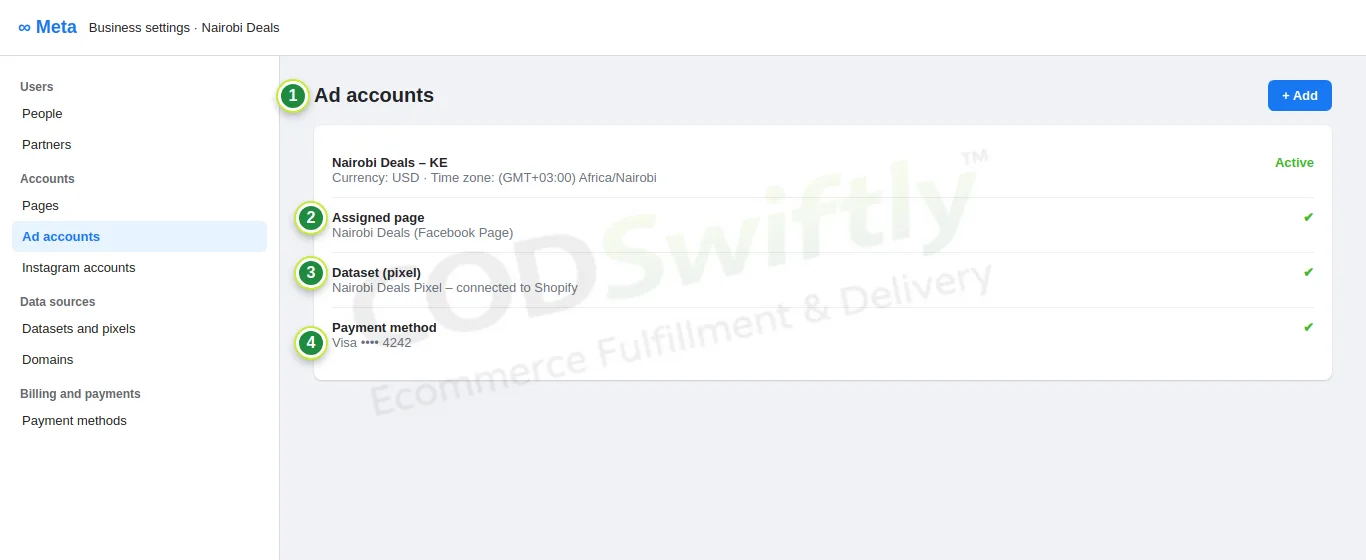
- 1Ad accounts: create it here (+ Add).
- 2Assign your Facebook Page.
- 3Datasets and pixels: your pixel, connected to Shopify.
- 4Payment method.
Connect the pixel to Shopify
In Shopify, install the free Facebook & Instagram app (by Meta), connect your account, choose your business portfolio, Page and pixel, and set data sharing to Maximum.
In EasySell → Pixels, add the same pixel ID: EasySell sends the Purchase event when a customer sends the COD form. Without it, Facebook does not know which ads bring orders.
The numbers in the pictures are examples that show how the screens work. They are not a promise of results.
Follow the course with a real account
Create your free CODSwiftly account: storage, call center confirmation, delivery and payouts in Kenya, Tanzania, Ghana and Zambia.